Buying a WordPress theme means agreeing to at least two sets of terms: the open-source license that covers the code, and the seller’s own license or terms that cover how you may use the product, the design assets and the support. Most confusion comes from mixing the two.
This guide explains each layer in plain language, shows how to read a theme’s license box, and lists the questions to ask before you buy. It is general information, not legal advice. For contracts with clients or large projects, read the seller’s full terms or ask a lawyer.
Layer 1: the GPL and WordPress code
WordPress is released under the GNU General Public License, version 2 or later. The WordPress project’s position, published on wordpress.org/about/license, is that derivatives of WordPress code inherit the GPL, and it treats themes and plugins as such derivatives. The same page acknowledges that there is some legal gray area about what counts as a derivative work.
What that means for theme buyers in practice:
- The PHP code of a WordPress theme is generally distributed under the GPL, so you can use and modify it.
- The GPL covers the code. Images, fonts, icons and other design assets in a theme or its demo can have their own licenses. Demo photos, for example, are often licensed for the demo only.
- The GPL doesn’t oblige a seller to provide updates or support. Those are services, and sellers sell them under their own terms.
Layer 2: the seller’s license and terms
On top of the code license, each marketplace or theme shop sets terms for using the product: how many sites, whether the end product can be sold, and what support you get. The names look similar across sellers but the details differ, so always read the specific seller’s page.
Free themes
“Free” usually means the theme costs nothing to download and use. It does not always mean free support, free updates through your dashboard, or free use of every demo image.
On Shtheme, free themes show a Free License ($0), with an optional paid add-on for installation and six months of support:
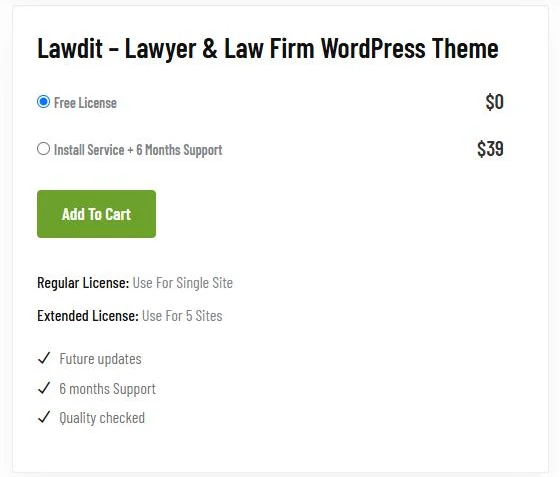
Regular and Extended licenses on Shtheme
Paid Shtheme products show four options in the license box. This is the box for Cafert, a café theme, as it appeared on 2 October 2026:
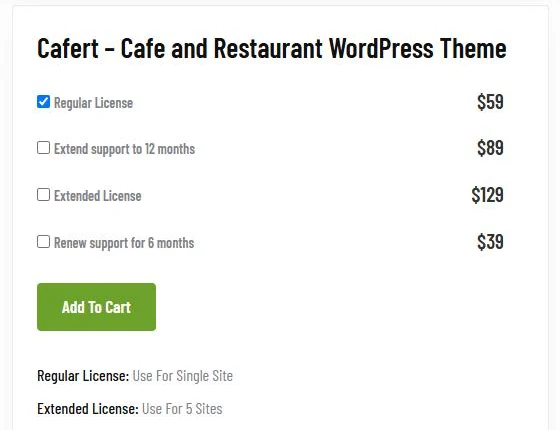
Reading it line by line:
- Regular License – the base price of the theme. The box states “Regular License: Use For Single Site”.
- Extend support to 12 months – the theme plus a longer support period.
- Extended License – stated as “Use For 5 Sites”.
- Renew support for 6 months – for existing buyers whose support period has ended.
Across the 263 paid themes we reviewed on shthemes.net, Regular License prices were $59, $69, $99 or $129 and Extended License prices were $129 or $199, depending on the theme. Prices change, so treat these as examples and check the product page. The product pages we opened (including Cafert, Lawdit, Maxid and Winta) also list “Future updates” and “6 months Support” under the license box.
Note that the license box on Shtheme’ free themes also shows the Regular and Extended notes. For a free theme, the price line that applies is the Free License; if you are unsure what applies to your project, ask the author through the product page before you build.
Regular and Extended licenses on ThemeForest
If you buy through Envato’s ThemeForest marketplace, the same words mean something different. According to Envato’s standard license page, both licenses cover one end product. The difference is money: a Regular License covers an end product that is not sold to end users, while an Extended License allows an end product that is sold. Envato also states that freelancers can charge clients for building a site under a Regular License, but can’t reuse one license for several client projects.
So “Extended” is about selling the end product on ThemeForest, and about the number of sites on Shtheme’ own store. That is exactly why reading the seller’s own wording matters.
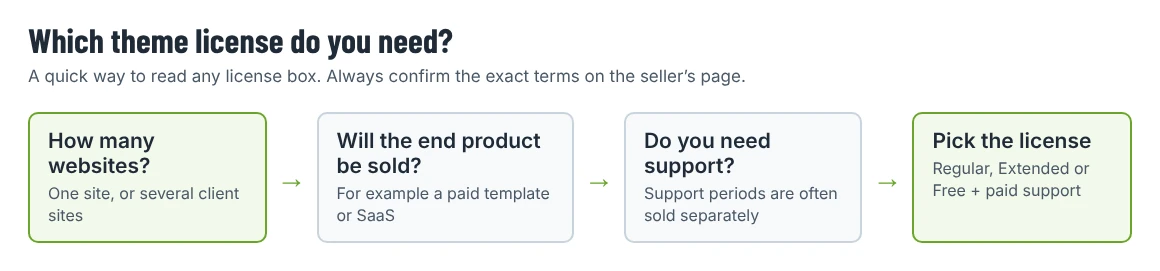
Which license do you need?
| Your situation | What to look for |
|---|---|
| One business website for yourself | The cheapest license that covers one site, plus the support period you need |
| A freelancer building one site for one client | One license per client site; check whether the license should be in the client’s name |
| An agency building several similar sites | A license per site, or a license that explicitly covers multiple sites |
| A product you will sell (a SaaS, a paid template, a membership site where people pay for access) | Check whether the seller restricts selling the end product; on ThemeForest this is the Extended License |
| A free theme for a non-profit or personal project | The free license, and check the image and font licenses before launch |
Questions to ask before you buy
- How many sites does the license cover? Count staging and development copies separately only if the terms say so; many sellers don’t.
- Can the end product be sold? Relevant for templates, SaaS products and paid memberships.
- How long is support, and what does it include? On Shtheme, support covers questions about features, bug reports and included third-party assets; it does not include customization, installation (unless bought), hosting or third-party plugin conflicts.
- How are updates delivered? Through the dashboard, through a marketplace plugin, or by downloading a new ZIP from your account.
- Are demo images included? Usually not for use on your live site.
- Are bundled premium plugins covered? Bundled plugins often receive updates through the theme, not a separate license key.
Common misunderstandings
- “GPL means I can install it on unlimited sites, so the license doesn’t matter.” The GPL governs the code. Updates, support and assets are covered by the seller’s terms, and those are usually what you are paying for.
- “Extended means extended support.” Not on either store we checked. Support periods are sold separately.
- “A free theme has no conditions.” Free themes can still include images, fonts or plugins with their own terms.
- “The client can use my license.” For client work, check whether the license should be registered to the client, so they keep access to updates if you part ways.
Before you add a theme to the cart
Open the product page and read the license box and the support section together. On any Shtheme product page you will find both in the right-hand column (or below the description on a phone). If the box leaves a question open, use the Contact the author form on the product page before buying.
Comparing free and paid options? Our shortlist of free business themes applies the same criteria to free themes from WordPress.org and from Shtheme, and the Shtheme catalog shows prices on every listing.