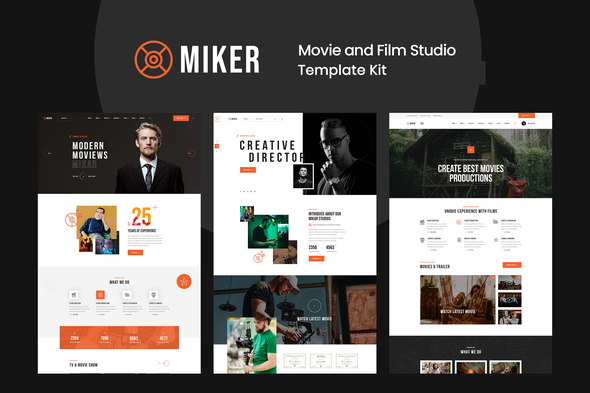
Miker Movie & Film Studio Elementor Template Kit is for Movie Production, Film studio, Creative & Entertainment Template Kit is mainly focused on filmmakers, film studios, film campaigns, film production companies and movie marketing. From the first glance, you will be impressed with its trendy and energetic design with smooth transitions and animations.
Required Plugins :
- Elementor (Free)
- Themesflat Addons For Elementor
- MetForm
Kit Key Features:
- One Click Demo Import
- Unique and Modern Style.
- Clear and Clean Layout
- Cross browser compatible
- Built-in Header Footer
- Post Widget
- Carousel Slide Box ( Create sliders with anything )
- Ultra Responsive and Retina Ready
- Compatible with most WordPress Themes
- Optimized for search engines
How to Install:
- Install and Activate the “Template Kit Import” plugin from Plugins > Add New in WordPress
- Do not unzip
- Go to Elements > Installed Kits and click the Upload Template Kit button.
- Before importing a template, ensure the Install Requirements button is clicked to activate required plugins
- For best results, do not import more than one template at a time.
How to Import Metforms
- Import the metform block templates
- Import the page template where the form appears and right-click to enable the Navigator
- Locate and select the Metform widget and click Edit Form. Choose New, then Edit Form. The builder will appear
- Click ‘Add Template’ grey folder icon.
- Click ‘My Templates’ tab.
- Choose your imported metform template, then click ‘Insert’ (click No for page settings).
- Once the template is loaded, make any desired customizations and click ‘Update & Close’ The form will appear in the template
- Click Update
Setup Global Header and Footer in Header Footer & Blocks plugin
- Import the header and footer template
- Go to Appearance > Header Footer and click Add New button
- Give it a title and select Header, Display on Entire Site and click Publish
- Click Edit with Elementor
- Click the gray folder icon to access My Templates tab and select the header template to import and Update.
- Repeat for Footer
This Template Kit uses demo images from Envato Elements. You will need to license these images from Envato Elements to use them on your website, or you can substitute them with your own.
- https://elements.envato.com/image-JVRH2CN
- https://elements.envato.com/image-VX7PNGT
- https://elements.envato.com/image-UVLTZPX
- https://elements.envato.com/image-NSCD965
- https://elements.envato.com/image-TH5Y9TX
- https://elements.envato.com/image-PX3MUP4
- https://elements.envato.com/image-GJXPAYL
- https://elements.envato.com/image-QM72TH4
- https://elements.envato.com/image-CFS6JJQ
- https://elements.envato.com/image-A6NAJGM
- https://elements.envato.com/image-XKMM2TC
- https://elements.envato.com/image-NHD8S6J
- https://elements.envato.com/image-FT8KVGA
- https://elements.envato.com/image-PQWAME4
- https://elements.envato.com/image-PQM9MME
- https://elements.envato.com/image-LC5AWR6
- https://elements.envato.com/image-UQXN858
- https://elements.envato.com/image-UM2YLZN
- https://elements.envato.com/image-DP27Z82
- https://elements.envato.com/image-SFQBRAM
- https://elements.envato.com/image-PU7PYPS
- https://elements.envato.com/image-PT4ZK5P
- https://elements.envato.com/image-XSVQQ8W
- https://elements.envato.com/image-P4BVTZS
- https://elements.envato.com/image-ZXY432U
- https://elements.envato.com/image-KR88FYP
- https://elements.envato.com/image-YSL9TAK
- https://elements.envato.com/image-DFC9EKF
- https://elements.envato.com/image-XBE4YQ5
- https://elements.envato.com/image-EPNAQ63
- https://elements.envato.com/image-XCZ4BYA
- https://elements.envato.com/image-JEJCDB6
- https://elements.envato.com/image-9258LQV
- https://elements.envato.com/image-4YFPDVL
- https://elements.envato.com/image-47GXGUD
- https://elements.envato.com/image-PRCGWM4
- https://elements.envato.com/image-MGMUK24
- https://elements.envato.com/image-CYXFCGC
- https://elements.envato.com/image-V47WSQZ
- https://elements.envato.com/image-QG2XHP7
- https://elements.envato.com/image-9ZRXUX7
- https://elements.envato.com/image-3GXVXFK
- https://elements.envato.com/image-4W3ATMR
- https://elements.envato.com/image-9AY45D5
- https://elements.envato.com/image-L4UDSHP
- https://elements.envato.com/image-JJYMU2S
- https://elements.envato.com/image-R5R7FBA
- https://elements.envato.com/image-BLH824M
- https://elements.envato.com/image-YJH8LVJ
- https://elements.envato.com/image-PCYNL98
- https://elements.envato.com/image-5F3GCDF
- https://elements.envato.com/image-FUPBCZV
- https://elements.envato.com/image-MPRU67J
Reviews (0)
Customer feedback for Miker – Movie & Film Studio Elementor Template Kit
No reviews yet. Be the first to review!
Leave A Review
Support
This author's response time can be up to 1 business day.
Supported
Popular question for this item
Missing style sheet error when installing the theme
This usually means the full download package was uploaded instead of the installable WordPress theme file. Extract the downloaded package first, then upload the theme ZIP found inside the package.
Item support includes
- Availability of the author to answer questions
- Technical questions about item features
- Assistance with reported bugs and issues
- Help with included third-party assets
Item support does not include
- Customization services
- Installation services
- Hosting, server, or WordPress maintenance
- Third-party plugin conflicts outside the package
Comments (0)
Buyer questions, presale notes, compatibility requests, and author replies.